


Tidio is one of the most widely installed live chat tools on small e-commerce sites, and Lyro, its AI agent, is the part most people are actually shopping for now. Caretta Assistant does the same core job, answering visitors from your own content, but bills for it in a completely different way and takes a different view of what the assistant should sound like.
This is a detailed side-by-side: what each one costs, what each can do, how differently they talk, and where each one is genuinely the better choice. Prices and capabilities are quoted from both products' own published pages as of 23 August 2026.
The short version
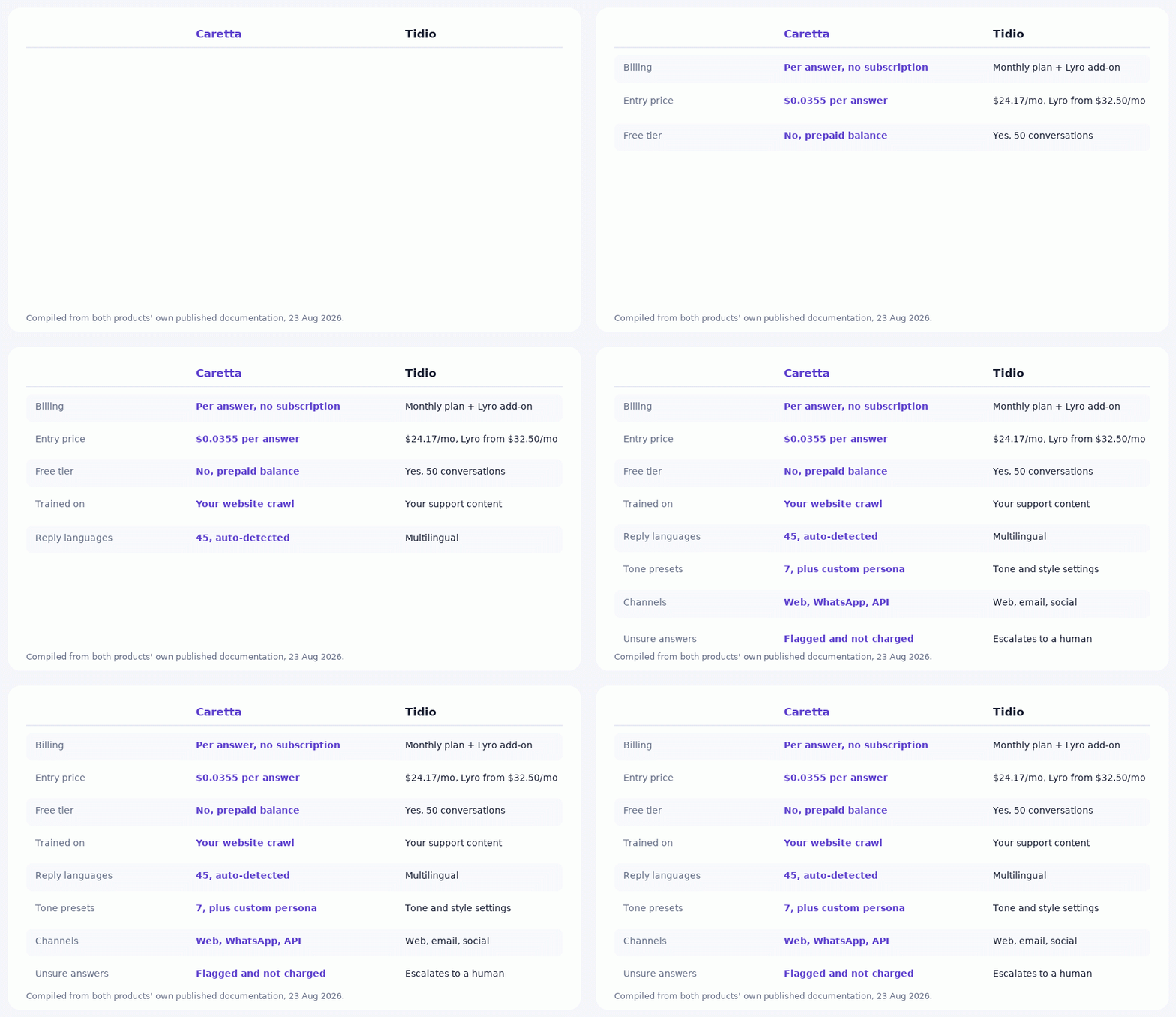
Tidio sells you a monthly plan and layers the AI on as an add-on. Caretta sells you nothing monthly and charges $0.0355 per answer. If your traffic is steady and heavy, a flat plan can win. If it is lumpy, seasonal, or just starting, per-answer billing almost always wins, because a quiet month costs you nothing at all.
The second real difference is voice. Tidio's Lyro is designed to stay tightly on script. Caretta is designed to sound like a specific person you configured, with a name, a personality and one of seven speaking tones.
Feature by feature
What Tidio does better
There is a free tier. Tidio's free plan includes 50 conversations and 50 one-off Lyro conversations. Caretta has no free plan at all: you top up a balance before anything runs. If you want to test an AI assistant without entering payment details, Tidio lets you and we do not.
Broader inbox tooling. Tidio is a full live chat suite with email, social channels, visitor tracking and Flows, its visual automation builder. Caretta is an answering assistant with a live chat panel attached, not a decade-old helpdesk. If you want drag-and-drop conversation flows with branching logic, Tidio has a mature product and we do not compete on that.
Published resolution figures. Tidio states that Lyro "boosts your resolution rate to 67% on average." We do not publish an equivalent industry-wide number, because ours varies enormously with how complete a site's content is, and a single average would be more marketing than measurement.
What Caretta does better
The meter only runs when someone is helped. There is no monthly floor. A month with forty questions costs about $1.42.
Repeated questions get cheaper, not more expensive. A question already in your knowledge base is served at $0.0122 instead of $0.0355. In plan-based pricing your most common questions consume the same allowance as your hardest ones.
Unsure answers are free. When confidence is low, the answer is flagged and not billed. We built it this way deliberately: charging for low-confidence output would give us a quiet incentive to let the model guess.
A daily budget ceiling ships as standard. Not an upgrade, not an enterprise feature. When the day's spend hits your limit, answers pause until tomorrow.
How differently they talk
This is the part a feature table cannot show you, and for most owners it matters more than a decimal point in the pricing.
Tidio describes Lyro as working "only with the content and guidance you provide. Always on script. Always on brand." That is a real design position and for a compliance-heavy business it is exactly right. The trade-off is that the assistant reads as a competent script rather than as a person.
Caretta starts from the other end. You give the assistant a name, write its personality in your own words, and pick one of seven speaking tones. The same question then comes back in a genuinely different voice.
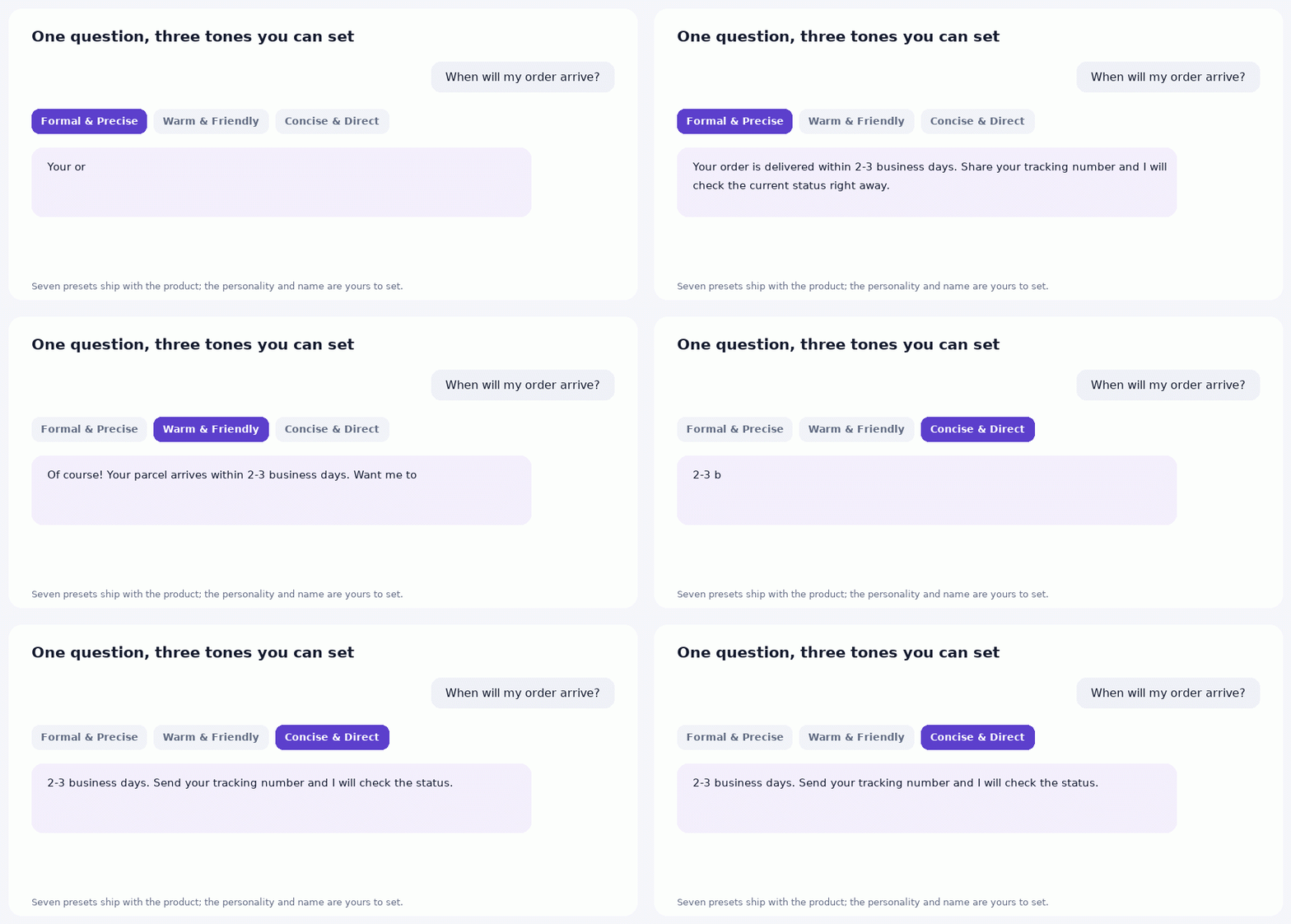
Notice that the facts never change between those three answers. Two to three business days is two to three business days in all of them. What changes is length, warmth and how much the assistant offers to do next. Tone shapes delivery, never content, and the assistant is still bound to what your pages actually say.
If you run several sites, each one gets its own identity. The assistant on your B2B parts catalogue can be formal and terse while the one on your gift shop is warm and chatty, from the same account.
Where each one is the right answer
Choose Tidio if
- You want to try an AI assistant with no payment details at all
- You need a full helpdesk: shared inbox, email, social channels, visitor tracking in one place
- You want visual automation flows with branching logic
- Your ticket volume is high and steady enough that a fixed monthly cost is predictable in a good way
Choose Caretta if
- Your traffic is seasonal, campaign-driven, or still small
- You do not want a subscription at all, in any month
- You care how the assistant sounds and want to shape it precisely
- You run several websites and want a separate identity for each
- You want a hard daily spend ceiling you control
What Caretta cannot do yet
An honest comparison has to include this list, so here it is.
There is no free plan. There is no drag-and-drop flow builder. Our channel coverage is narrower: web widget, WhatsApp and the REST API, while Tidio also covers email and social inboxes. And one-click ticket escalation to a human exists in the dashboard assistant but not in the public API, where integrators get a low-confidence flag and build their own handoff. If a human handoff inside a packaged inbox is central to how you work, that is a real gap.
Switching, practically
Both install the same way, as a snippet in your site's HTML, so running them side by side for a week is genuinely easy: put Caretta on a staging copy or a single section, ask it the twenty questions your customers actually ask, and compare answers.
On WordPress there is a plugin in the official directory, on Wix an App Market listing, and everywhere else the one-line snippet. Training is $0.15 per page, once, quoted and approved before the crawl runs, so a 60-page shop costs about $9 to teach.
Common questions
Is per-answer billing more expensive at high volume?
It can be. At several thousand answers a month, do the multiplication before assuming: 5,000 answers is about $178, and at that point a flat plan with a generous AI allowance deserves a serious look. We would rather you run the arithmetic than take our word for it.
Can I keep Tidio and add Caretta?
Technically yes, both are script tags, but two chat bubbles on one page is a bad visitor experience. Use one on staging, or on a single page, while you compare.
Does Caretta learn from my past conversations?
It learns from your website content during training. Tidio additionally states that Lyro learns from human agent responses over time, which is a genuine difference in approach worth knowing about.
Which one is more likely to make something up?
Both ground answers in supplied content rather than open-web knowledge. Caretta additionally declines to charge for answers it is not confident in, which is a commercial signal rather than a technical guarantee, and says so to the visitor instead of guessing.
Prices and features change on both sides. Before deciding, check Tidio's pricing page and the live figures on the Caretta Assistant page, which are read from the same constants the dashboard bills with.